
NAM Guide
What is NAM?
Neural Amp Modeler (NAM) is a free, open-source technology that uses artificial intelligence to create highly accurate digital models of real analog music equipment.
This includes:
•Guitar amplifiers
•Bass amplifiers
•Effects pedals
•Studio preamps
•Analog outboard gear
•Entire signal chains
Unlike traditional amp simulators that attempt to recreate hardware using circuit modeling, NAM learns directly from real audio recordings of physical gear. The neural network is trained using these recordings so it can reproduce the tone and dynamic response of the original equipment.
The result is a NAM capture (also called a NAM profile or NAM model) that behaves extremely close to the real hardware.
NAM represents a major step forward in digital audio processing, combining machine learning and audio engineering to reproduce the nonlinear behavior that makes analog gear sound musical and unique.
Who is NAM for?
Neural Amp Modeler is designed for musicians and audio professionals who want authentic analog tone with the flexibility of digital workflows.
NAM is ideal for:
•Guitarists recording at home
•Bass players looking for realistic amp tone
•Producers working fully inside the DAW
•Mixing engineers using analog-style processing
•Studios archiving rare or expensive hardware
If you want the character of real analog gear without the limitations of physical equipment, NAM offers an extremely powerful solution.
Supported Software
NAM captures can be used in a growing ecosystem of plugins and hardware.
Official plugin
Both plugins allow you to load NAM captures directly into your DAW and process audio in real time.
Input Level Calibration
Important
Our captures are pre-calibrated at -18 dBFS input level.
This calibration ensures:
•accurate harmonic behavior
•proper gain staging
•optimal headroom
•consistent tone reproduction
Using an input level close to -18 dBFS will deliver the most authentic result.
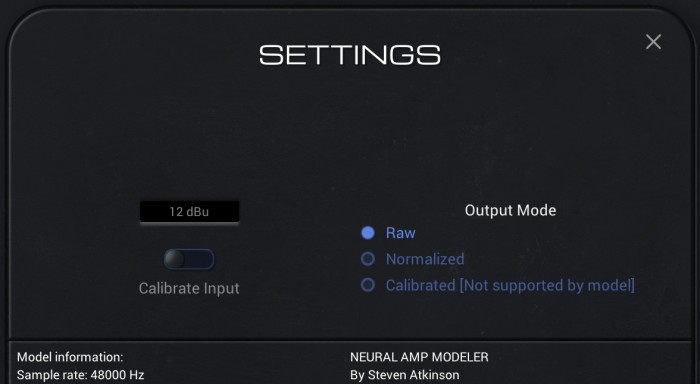
Plugin Settings
Neural Amp Modeler Plugin
To match the original capture tone, use the following setting:
Calibrate Input: OFF
Output Mode: Raw
Stereo Usage
our captures support stereo processing.
NAM Universal
NAM Universal fully supports stereo processing.
Simply load the capture in a stereo track.
Neural Amp Modeler Plugin
The official NAM plugin is mono.
However, you can use it in dual mono configuration to process stereo signals.
Load two instances of the plugin:
•Left channel
•Right channel
This effectively allows stereo operation inside your DAW.
Tokyo Studio Capture Profiles
Tokyo Studio Capture profiles are created using real studio gear, analog outboard equipment, and professional signal chains captured in Tokyo.
The goal is to reproduce the depth, tone, and musical response of real hardware while keeping the workflow fully inside your DAW.