
NAM Guide
The Easiest Way to Experience NAM
Neural Amp Modeler (NAM) is one of the most accurate audio modeling technologies available today.
Thanks to the introduction of NAM A2, it now delivers an unprecedented level of realism while also improving CPU efficiency, making it easier than ever to bring authentic analog hardware into your DAW.
Whether you’re using guitar amplifiers, mastering compressors, EQs, tape machines, or microphone preamps, NAM reproduces the nonlinear behavior of real hardware with remarkable accuracy.
The Easiest Way to Use NAM
We highly recommend using TSC Rack.
TSC Rack was specifically designed to make working with NAM simple, fast, and enjoyable.
Unlike traditional NAM workflows, it provides:
・Built-in profile browser ・Four independent slots ・Stereo support ・True Stereo support (L/R profile loading) ・Built-in Mix control with Auto Phase Calibration (Learn) ・Native Sample Rate Processing ・Automatic profile folder managementSimply copy your profiles into the default folder, reload the plugin, and they are immediately ready to use.
No complicated setup. No manual importing. No sample rate configuration.
Learn More About TSC Rack
Discover all features, workflow tips, and how TSC Rack integrates with NAM A2.
Ready to Get Started?
Download TSC Rack and experience the simplest way to use NAM.

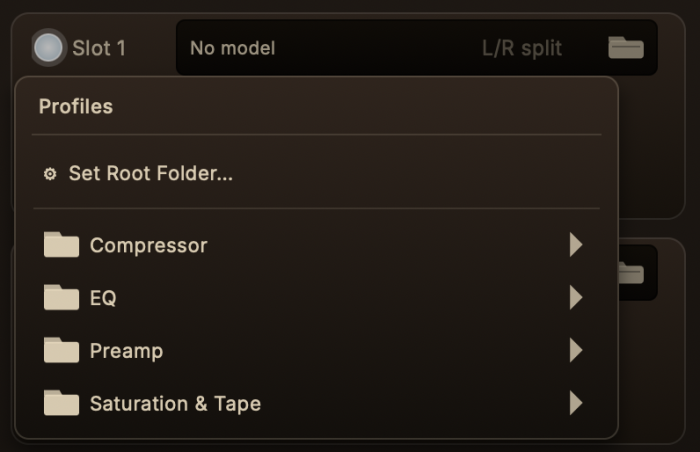
Installing Profiles
After installing TSC Rack, a default profile folder is automatically created:
/Music/Tokyo Studio Capture/TSCRack
Simply copy your purchased .nam files into this folder.
Restart or reload the plugin and your captures will immediately appear in the browser.
Already have your own NAM collection?
No problem.
Simply choose your existing folder using Root Folder, and TSC Rack will use your existing library without moving any files.
NAM A2
The latest generation of Neural Amp Modeler.
NAM A2 significantly improves:
・Capture accuracy
・Harmonic reproduction
・Dynamic response
・CPU efficiency
It represents the biggest advancement in NAM since the project began.
Tokyo Studio Capture has updated every capture to the new NAM A2 architecture.
Official Plugin (Free)
If you prefer using the official NAM plugin, you can download Gateway free of charge.
Gateway is developed by the NAM project and fully supports the latest NAM A2 models.
Please note
Gateway currently processes mono instances.
Stereo material can still be processed by loading separate Left and Right instances (dual mono), but for the simplest stereo workflow we recommend TSC Rack.
Input Level
Input Level
For the most authentic hardware behavior, our captures are calibrated for:
-18 dBFS Input
Keeping your input signal close to this level provides:
・Accurate harmonic behavior
・Proper dynamics
・Consistent tone
・Authentic gain staging
Using TSC Rack?
TSC Rack includes a built-in VU meter to make gain staging quick and intuitive.
Simply adjust the input so the meter stays around the reference marker (sweet spot) during normal playback.
This helps you feed the profiles at the intended level without relying solely on peak meters.

Tokyo Studio Capture Profiles
Every Tokyo Studio Capture profile is created from real analog hardware located in Tokyo.
Each capture is carefully calibrated and optimized for NAM A2 to preserve the tone, dynamics, and musical response of the original equipment.
Whether you’re using compressors, mastering EQs, tape machines, microphone preamps, or saturation processors, our goal is simple:
Bring the sound of world-class analog hardware directly into your DAW.